

I installed it mainly for the AI detection feature. It gives me a clearer idea of how my text might be flagged. I still revise manually, but it's a solid support tool.
One of Google's favorite extensions
Smodin for Chrome
Smodin works wherever you do, so you always have the writing tools you need to succeed. Write better emails in Gmail, improve documents in Google Docs, and enhance your writing in Notion - all with one powerful Chrome extension.
Write better everywhere with Smodin
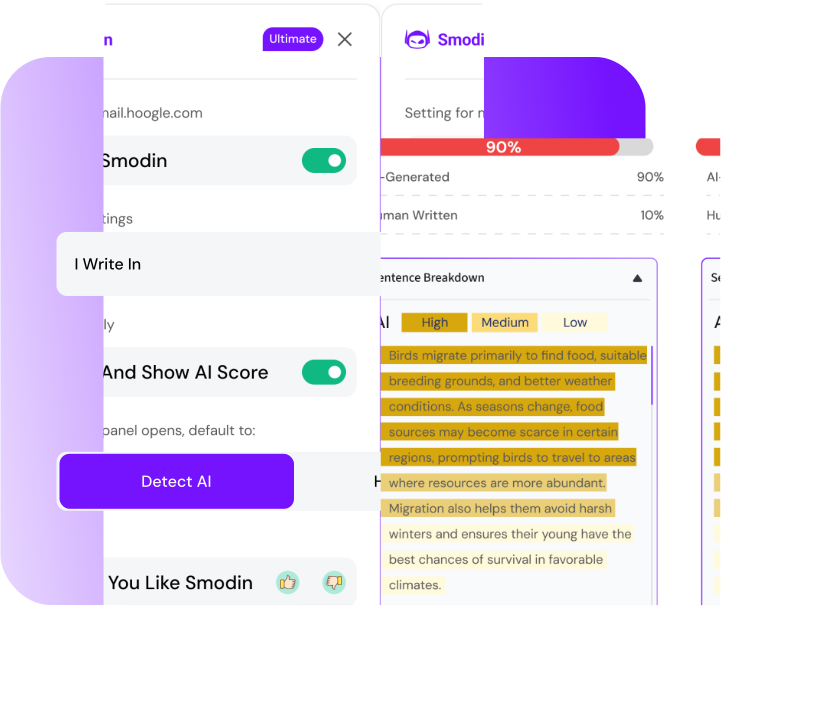
AI Detection and Sentence Analysis
Want to know if your text was written with AI? Smodin will show you exactly that and highlight any spots that might be AI. It's extremely easy to distinguish machine-style writing from natural writing.
Humanize With One Click
Text sounding boring or robotic? One click and it's lively, clear, and easy to read. Perfect for emails, posts, or any notes.
Multi-language Support
Working in more than one language? No problem! Smodin supports over 50 languages, so you can write, translate, and edit quickly and easily.
Easy-To-Use Side Panel + Shortcuts
Open the side panel and use quick commands for all main menus: AI Detection with Sentence Analysis and Humanization with changes shown.
Trusted by 1 Million+ Users worldwide
Smodin for Chrome is available in the Web Store. So what are you waiting for?
Write effortlessly
Draft anything with ease
Eliminate errors
Improve grammar and spelling
Learn effectively
Improve your writing skills
What users say about the extension
See what users say about the AI content detector and Humanizer in Google Docs, Notion, and more

If you need a fast AI detection check, this does the job well. It's lightweight and doesn't slow down my browser.

I've been using it for school and casual writing. The humanize option helps smooth things out when text feels too robotic.

Best for short paragraphs and emails. It fits nicely into my workflow and is easy to use.

I use this as a final check before posting or submitting content. It's not something I rely on alone, but it adds peace of mind.

The extension helps flag AI-like phrasing and gives a cleaner rewrite. I still make small edits after, but it saves time during revisions.

I like that it runs directly in the browser instead of copying text back and forth. The AI detection feels reasonable and consistent for what I need.

This awesome feature makes AI-written stuff sound totally human, not like a robot. Seriously helps with getting papers to sound natural.

This plagiarism checker is a total lifesaver for school papers. It quickly tells you if you accidentally copied something, super easy to use!

As a freelance writer, I juggle multiple clients and deadlines. Their all-in-one platform keeps my projects organized and my writing polished.

I mainly use the extension to check short paragraphs before submitting work. It's fast and easy to run without leaving the page. I still double check things myself, but it helps spot obvious AI patterns.

This comes in handy when I need to humanize a few lines of text. It doesn't magically fix everything, but it makes the wording feel less stiff. Works best on shorter sections.
Why people love us
4.8/5 | 1 Million+ Users
Prateek
April 19, 2023Smodin.io is an exceptional app that offers a range of outstanding features designed to help users with their research and content creation needs. One of the app's most impressive features is the Article 2.0, which generates high-quality articles and provides references for further study. The app's ChatIn feature and Research Paper generator are also incredibly unique, allowing users to conduct thorough research on the internet and find genuine paraphrased papers. One of the most impressive aspects of Smodin.io is its customer service team. The team is highly responsive, always available to help, and goes the extra mile to understand users' issues and offer solutions. This level of commitment to customer satisfaction is commendable and sets Smodin.io apart from its competitors. Another notable feature of Smodin.io is its continuous improvement. Every time you use the app, you'll notice new features that have been added based on feedback and recommendations. This level of attention to user feedback is remarkable, and it shows the app's developers' commitment to ensuring that Smodin.io remains the best in the market. I highly recommend Smodin.io to anyone looking for a reliable and efficient research and content creation tool.
Jack L.
October 1, 2023Despite Smodin struggling in very few areas of my stats homework, it has overall done a phenomenal job. Smodin is by far the most accurate AI math tool I've used. The explanations use relevant solving methods and more often than not are accurate. I compared it with openai (chatgpt) and smodin outperformed openai by a significant amount in the tasks I needed it to do.
Esther S.
October 25, 2022Work smarter, not harder. Smodin.io embodies this motto. I love that they implement accessibility in their pricing models! And after reaching out to support I was able to a response in less than an hour. I would encourage everyone with a passion for writing to look into Smodin.io seriously. AI is the future, and this is a resource I am glad to have discovered the existence of. Thank you to all the people who made this resource possible! Sincerely, ~E.S.
Lyana M.
March 15, 2024I like this app. This app is useful mainly for student
FAQs
FAQs - Smodin Chrome Extension
Common questions about the AI content detector and Humanizer in your browser
Go to the Chrome Web Store, find Smodin, and click Install. It only takes a few seconds.